Promotional banner To Be here.

In the Civil Site Design v26 release for AutoCAD and BricsCAD, a new Clone String command has been added. This command allows users to create a clone of an existing string as a profile string including the alignment and vertical profile.
This command turns what was a multi-step process into a one step process. You can clone road, network and profile strings including the vertical designs.
Once the command has been run, a new alignment and profile string will be created and the vertical profile of the original string copied to the new profile string.
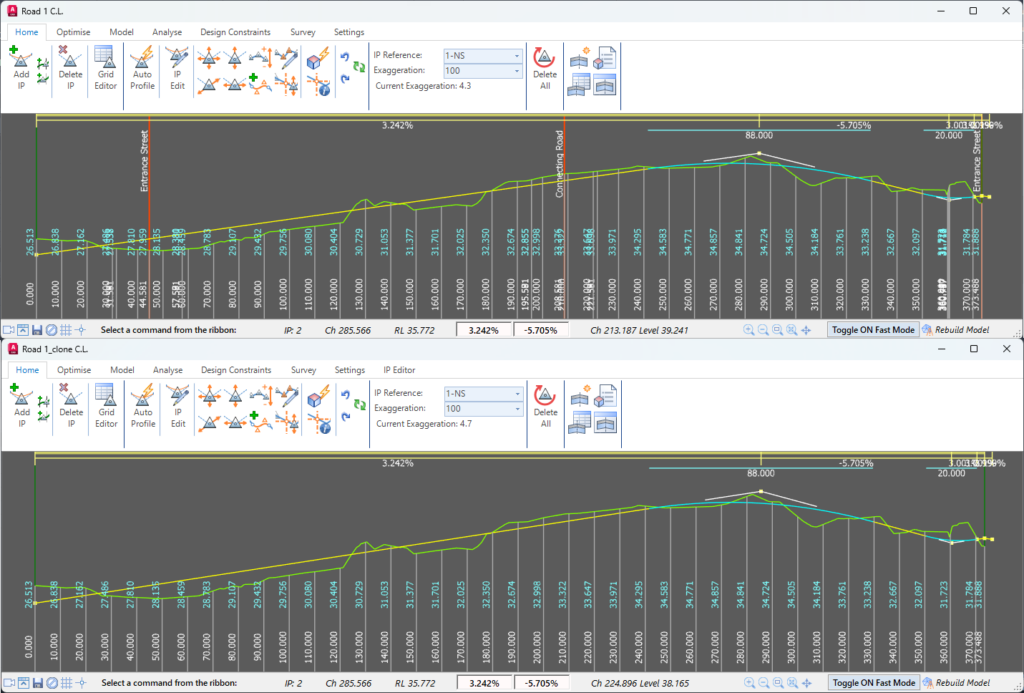
Image: Vertical Grading Editor showing Road 1’s vertical profile copied onto the Road 1 clone string.
The new Clone String command can be accessed via the Ribbon (Roads Tab > Design Panel >,Profile String drop-down > Clone String).
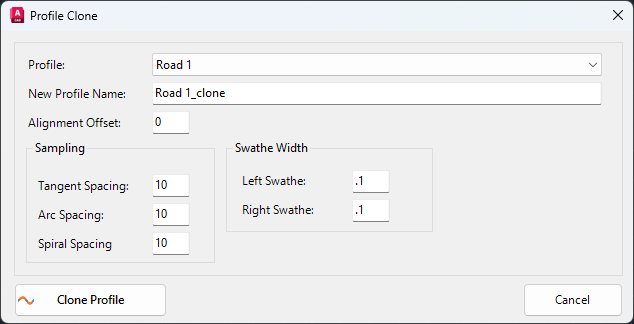
Image: Profile Clone form.
The Profile Clone form allows the user to set the following:
The alignment offset input offers the option for the new alignment to be created at an offset from the original geometry, so as to not overtop of the original. Sampling frequency is able to be set separately for tangents, arcs and spirals, similar to when creating a Profile or Road string.
If you wish to edit the sampling frequency or swathe width after the cloned string has been created, you can use the Resample Sections command. Post creation, the cloned string behaves independently of the original string.
An example of when this command may be useful is in setting up string control for an edge of bitumen. The user can clone the centerline at an offset to the original alignment equal to the pavement width. This will create the edge of pavement alignment, and profile, and copy the vertical profile of the centerline as a starting point for the final vertical design.
This command could also be used to create duplicates of strings to test multiple vertical design options.


Copyright Civil Survey Applications 2026 | All Rights Reserved | Website Design by Fox & Lee